One medication list the whole family can trust.
Scheduled and as-needed doses, refill reminders, and a printable med list for every appointment.
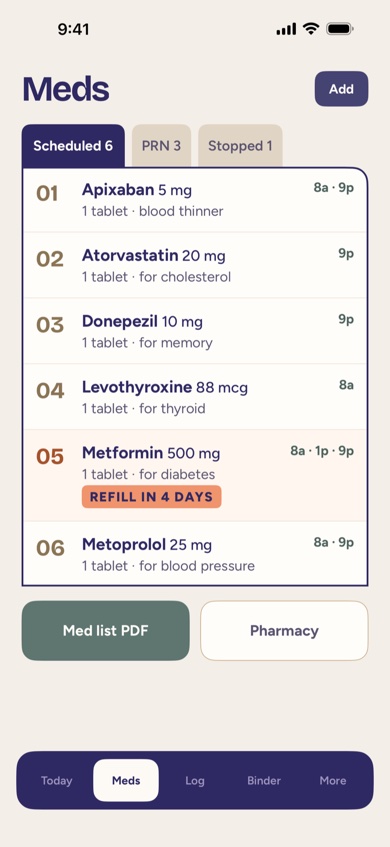
Keeping the list current
Every medication lives in one place: name, strength, form, dose, schedule, and what it's for. Scheduled medications (twice a day, every evening, and so on) sit alongside as-needed ones, and a medication that's been stopped moves to its own tab instead of disappearing — useful when a new doctor asks what a parent used to take.
Checking off doses
Today's schedule shows every dose due, grouped by time. Whoever is with a parent when a dose is given checks it off, and the record keeps who marked it and when. That means a daughter checking in by phone that evening can see the 8 a.m. and 1 p.m. doses were both given, without a text chain.
Refill reminders
FolksKeeper tracks how many doses are left for a medication and reminds the person responsible a few days before it runs out — enough time to call the pharmacy instead of discovering an empty bottle on a Sunday night.
Printing the list for an appointment
The Med List PDF lays out every current medication the way a nurse or physician wants to see it, ready to print or share before a visit, a hospital stay, or a specialist who's never met the family before.
Where to find it
Medications live in the Meds tab, under Scheduled, PRN (as needed), and Stopped, and the Med List PDF button sits just below the list. Today's doses also show on the Today screen, where whoever gives one checks it off.
How FolksKeeper helps
- One list for scheduled, as-needed, and stopped medications — nothing scattered across notebooks.
- Dose check-off so the whole Care Circle can see what's been given, and by whom.
- Refill reminders timed to arrive before the bottle actually runs out.
- A printable Med List for appointments, hospital stays, or a new provider.
Frequently asked questions
Does FolksKeeper check for drug interactions?
No. FolksKeeper is an organizer, not medical advice — it doesn't check interactions, dosing, or safety. Always confirm changes with a doctor or pharmacist.
Can more than one family member check off doses?
Yes. Anyone in the Care Circle who can make changes can mark a dose given, and everyone sees the same up-to-date schedule.
How do refill reminders decide when to notify someone?
They're based on how many doses are left and the schedule for that medication, giving a heads-up several days before the supply runs out.
Can I print the medication list for a doctor's visit?
Yes, from the Meds tab, using the Med List PDF button.
What happens if a medication is discontinued?
Mark it discontinued and it moves to the Stopped tab instead of being deleted, so the history stays available.
Related pages
See it for yourself
FolksKeeper will be available soon on the App Store, for iPhone.
Coming soon to the App Store