Walk into every appointment ready.
Questions to ask, what the doctor said, who's driving, and action items everyone can see.
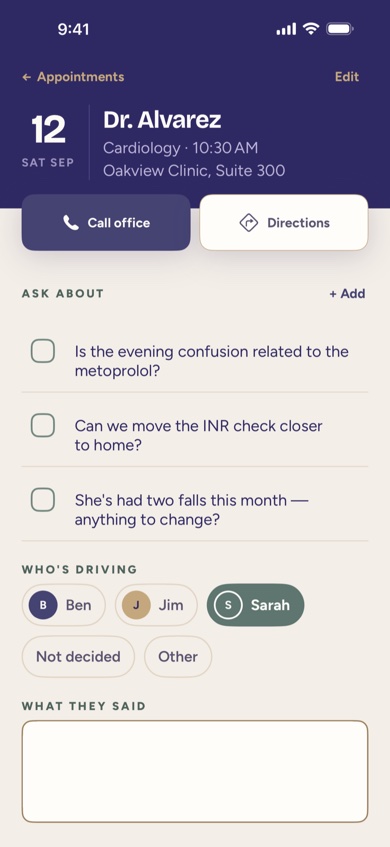
Before the visit
Add questions as they come up during the week, instead of trying to remember them in the parking lot. When you're adding a visit, typing the clinic's name or address brings up matching places from Apple Maps, so the location is accurate without retyping it by hand.
Who's driving
A simple picker shows who in the Care Circle is driving to a given appointment, or flags it clearly when no one has volunteered yet — so it doesn't get discovered the morning of.
During and after: what the doctor said
After the visit, notes on what the doctor said and a list of action items live right on that appointment, visible to the rest of the Care Circle. An action item can turn into a task with one tap, so it doesn't get lost between the parking garage and home.
Adding it to Calendar
One button opens Apple's own Calendar event editor with the date, time, and location already filled in. FolksKeeper doesn't read your calendar or ask for calendar permission — it simply hands the details to Calendar and lets you take it from there.
Where to find it
Appointments are in the Binder tab, under Upcoming and History. The next one also shows on the Today screen, with who's driving and how many questions are waiting.
How FolksKeeper helps
- Questions to ask, collected all week instead of remembered at the last minute.
- Apple Maps address suggestions when you're adding a visit's location.
- A driver for every visit, decided ahead of time instead of the morning of.
- Notes and action items the whole family can see after the visit, with one tap to Calendar.
Frequently asked questions
Does FolksKeeper suggest questions to ask the doctor?
No — you and your family add your own questions. FolksKeeper is an organizer, not medical advice, so it doesn't generate clinical questions or interpret answers.
How does the address suggestion work?
As you type a location, FolksKeeper asks Apple Maps for matching places so you can pick the right one; the text you type is handled under Apple's own privacy policy and never reaches FolksKeeper's team.
Can action items turn into tasks?
Yes, an action item from an appointment can become a task assigned to someone in the Care Circle.
Does adding a visit to Calendar require any extra permission?
No. It opens Apple's own event editor with the details filled in; FolksKeeper never requests calendar access.
Can I see past appointments?
Yes, the History tab keeps a record of past visits along with their notes and action items.
Related pages
See it for yourself
FolksKeeper will be available soon on the App Store, for iPhone.
Coming soon to the App Store