Share the caregiving, not just the worry.
Family joins through iCloud, with no accounts to create — including the person you're caring for.
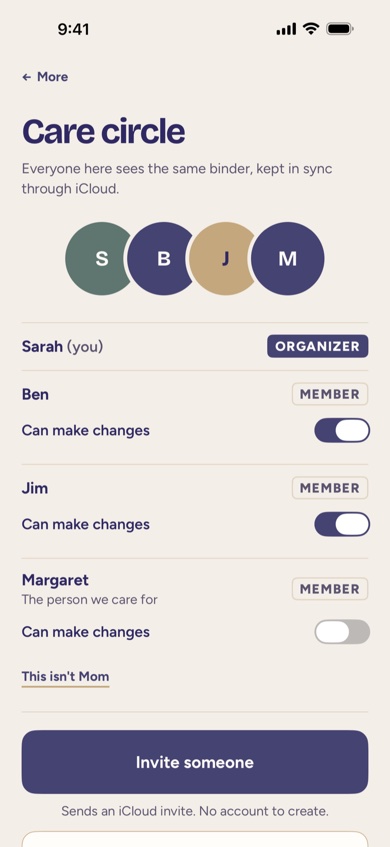
Inviting family
From More › Care Circle, the Organizer sends an invite through Apple's own sharing sheet — a text, an email, however is easiest. Whoever accepts it, using the iCloud account already on their phone, sees the same binder from that point on. There's no FolksKeeper account to create and no password to remember.
The person you care for can join too
If the person you're caring for has their own Apple Account, they can be invited into their own Care Circle. Their invite starts without editing turned on, so they can see everything without accidentally changing it, and it doesn't count toward the free plan's two people.
Choosing who can make changes
The Organizer decides, person by person, who can add and edit information versus who can only read it. Someone who can't make changes still sees the whole binder — the add and edit buttons are simply hidden for them.
Tasks: who's doing what
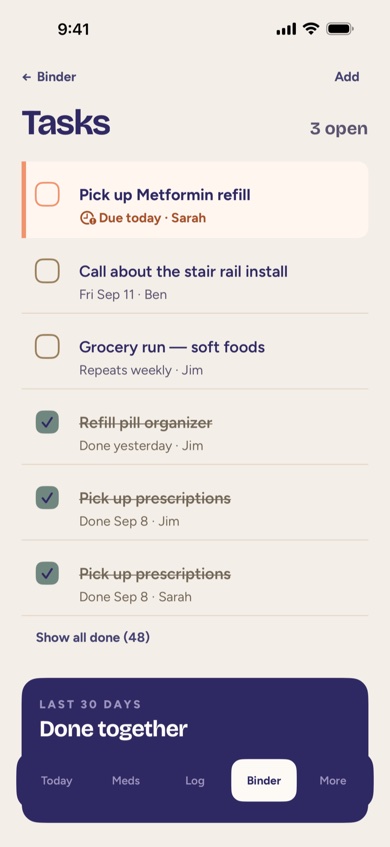
Errands and to-dos — picking up a refill, calling about a stair rail, a grocery run — live in Tasks, each with a due date and the person in the Care Circle who's doing it. At a glance you see who's doing what, plus a shared tally of everything the family got done together this month.
Where to find it
Care Circle is under More, next to Subscription and Export All Data. Tasks are in the Binder tab, alongside Appointments, Documents, and Contacts.
FolksKeeper is an organizer, not medical advice. Sharing a Care Circle shares information your family already has — it doesn't add any clinical guidance of its own.
How FolksKeeper helps
- Invites sent through Apple's own sharing sheet — no accounts, no passwords.
- The person you care for can join with their own Apple Account, view-only by default.
- Person-by-person control over who can make changes versus who can only read.
- A shared Tasks list so errands and to-dos aren't tracked in someone's head alone.
Frequently asked questions
How do invites work?
The Organizer sends an invite using Apple's own sharing sheet; the person invited needs to be signed in to iCloud on their device to accept it.
Can I control who edits versus who just views?
Yes. The Organizer can turn "Can make changes" on or off for each person in the circle at any time.
How many people can be in a free Care Circle?
Two, plus the person you're caring for if they join separately. FolksKeeper Family removes the limit.
Can someone leave a Care Circle?
Yes, any member can leave at any time from within the app.
Is Care Circle sharing private?
Yes. It's invitation-only sharing through your family's own iCloud — never public or discoverable.
Related pages
Bring the family in
FolksKeeper will be available soon on the App Store, for iPhone.
Coming soon to the App Store